
Protect your premises with independently certified, insurance-recognised security. This guide explains what LPS 1175 is, how Issue 8 differs from Issue 7, and what attack testing actually involves—so you can specify the right door, shutter or grille with confidence.
LPS 1175 sets out the requirements and test procedures for physical security products (doors, shutters, grilles, enclosures, fencing) to resist forced entry. Products are tested by BRE/LPCB and listed when they meet the required performance. That’s why insurers and police prefer or require LPS 1175 for higher-risk sites.
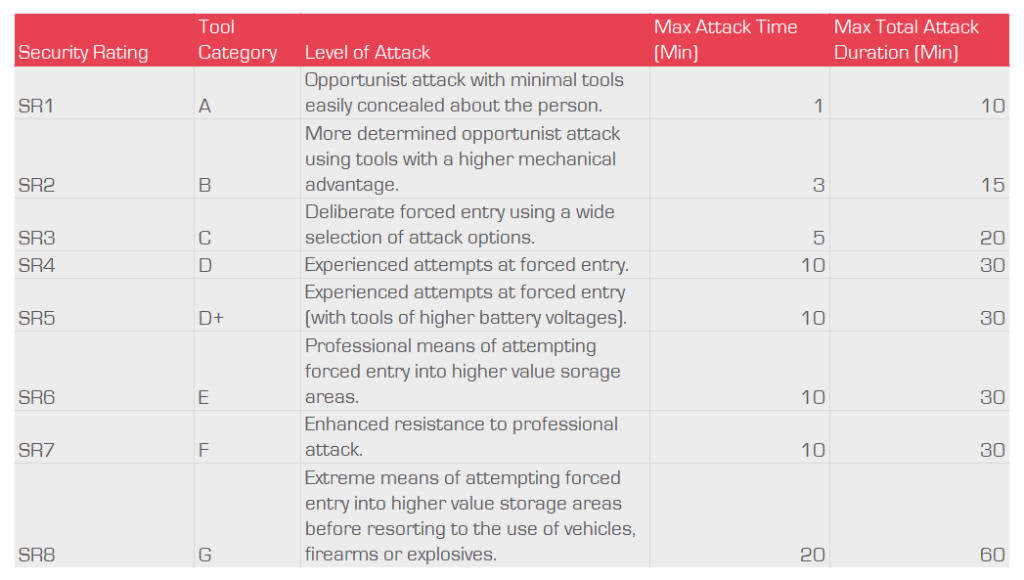
Two-part classification:
Example: B3 means the product resisted Category B tools for at least 3 minutes. A1 is the entry level; higher letters and numbers mean tougher tools and/or longer delays.
securitydirectuk.com
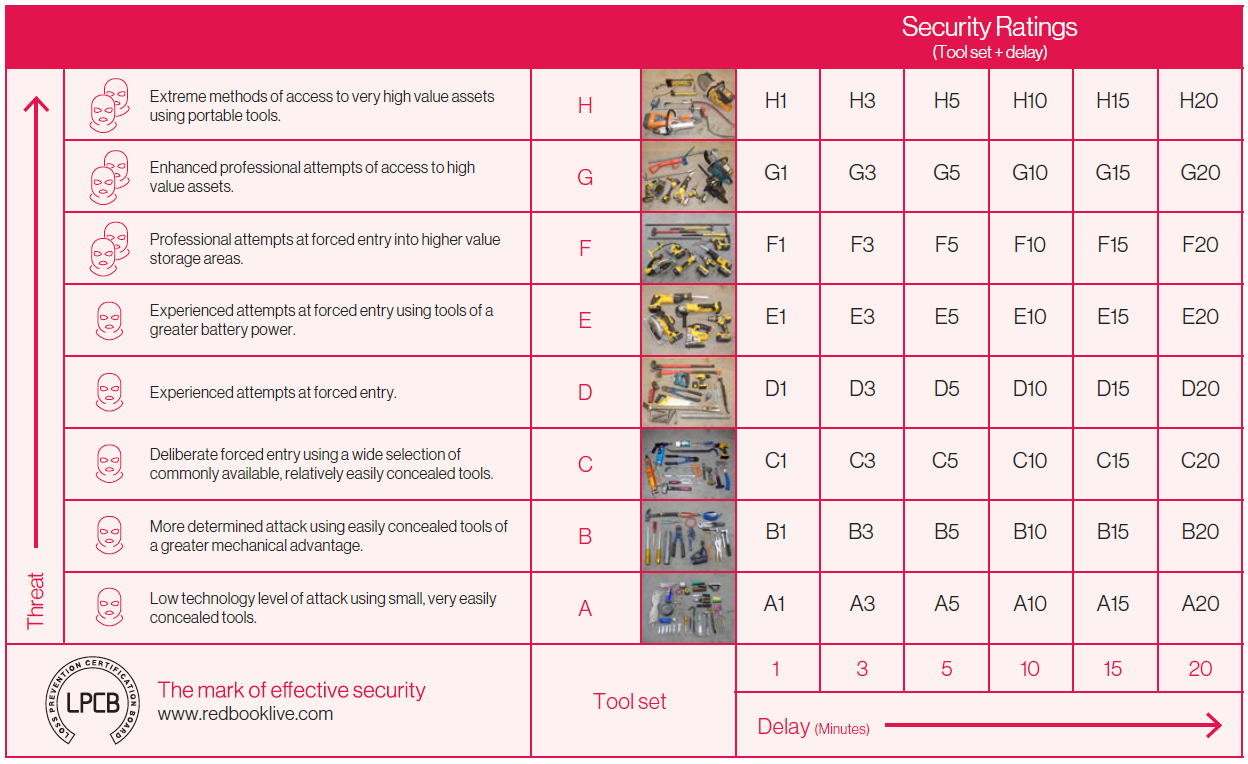
During an LPCB test, trained testers attempt a break-in using a defined toolkit (matching the rating sought) for a measured working time. The outcome is the certified rating. Issue 7 used SR1–SR8; Issue 8 records both tools and time, which more closely mirrors real-world threats—from opportunists with simple hand tools up to determined attackers with heavier kit.
| Legacy spec (Issue 7) | Commonly referenced in Issue 8 |
|---|---|
| SR1 | A1 |
| SR2 | B3 |
| SR4 | D10 |
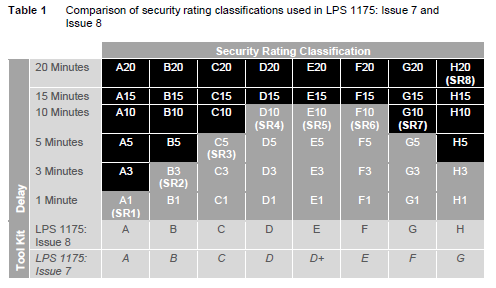
Notes: These mappings are widely used in manufacturer literature and spec guidance, but the precise performance of any product is what’s printed on its latest LPCB certificate. Always verify the exact A–H / 1–20 code for compliance.
Yes—many products retain valid Issue 7 (SR) certifications. For newly tested products, Issue 8 applies.
To reflect real-world attacks more closely and to encourage layered security by specifying both tools and delay time.
Letter = tool category; number = minutes resisted. So B3 = Category B tools for 3 minutes; D10 = Category D tools for 10 minutes.
There isn’t a perfect one-to-one conversion for all cases. Common references include SR1 ≈ A1, SR2 ≈ B3, SR4 ≈ D10—but always check the product’s latest LPCB listing.
Get a tailored recommendation for your site risk and insurance requirements.
Request certificates and product data sheets for your records.
Combine barriers (e.g., shutter + door) to extend delay time and improve real-world protection.
Not sure which product suits you needs? We can help you build a quote online within 5 minutes